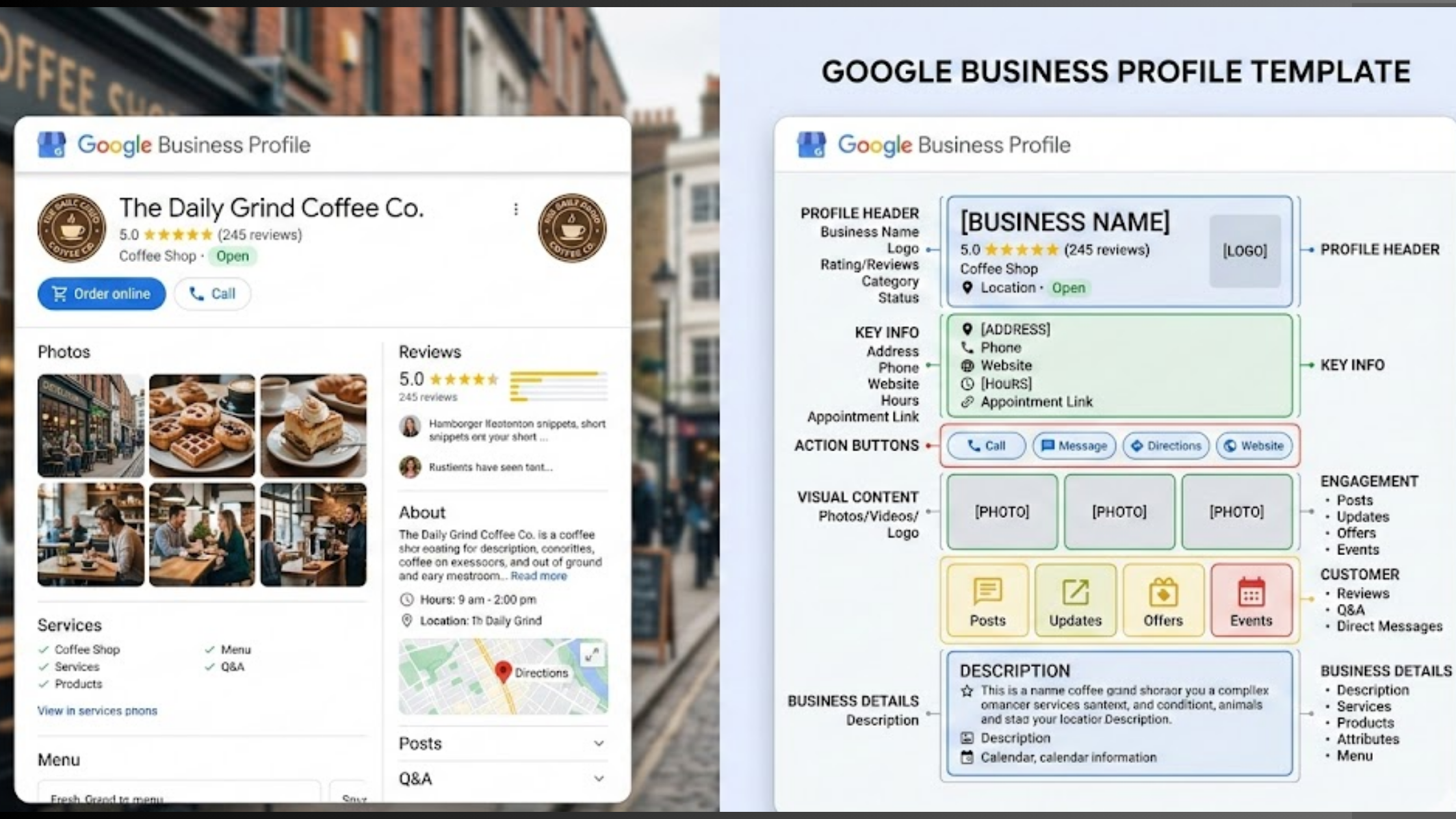
If you run a local business, you already know how important it is to show up when people search for what you offer. You want your name right there in the local results, so customers can find it easily.
That is what a Google Business Profile does for you.
However, just having a profile is not enough. You have to keep it alive. You have to feed it fresh information. Google Business Profile posting strategy is a must-have.
Posting regularly tells Google you are still open and active. It gives customers a reason to click on your listing instead of a competitor’s.
And when done right, it can bring more calls and more foot traffic through your door.
In this article, you will learn what to post, how often to post it, and the common mistakes to avoid. By the end, you will have a clear plan to make your profile work harder for your business.
What Should You Post on Your Google Business Profile?

You don’t want to be the business that only posts sales pitches. You want to be useful and interesting. Google lets you share several types of posts. Ptimize on these:
- Offers and Promotions: Share your discounts and special deals, and be clear about the offer and tell people to come in or buy.
- Events: If you are hosting a workshop, a sale day, or any gathering, put the details here.
- Products: Show off specific items you sell. Include a photo, price, and short description. Restaurants use this for new dishes; stores use it for new arrivals.
- Updates and Announcements: Share new hires, changes in hours, or news about your business.
- Behind the Scenes: Post photos of your team or a quick video of how you make your product. It makes your business feel human.
- User Content: Share a consensual photo a customer took. It shows real people love your business.
Which Posts Help You Rank?
If you post, will you rank higher?
Yes, but indirectly. According to Google, posts are not a direct ranking factor like reviews are. But they are still very important.
When you post regularly, Google sees that your business is active. It looks like you care about your online presence.
But the power is in what posts create: engagement.
When someone sees your post and clicks on it to call you, get directions, or visit your website, that tells Google that people are interested in you.
Google notices this interest. It thinks, “This business is popular, let’s show it to more people.”
So, the post itself isn’t the magic trick. The clicks and calls it creates are the magic trick. Those actions strengthen your profile and improve your visibility.
Which posts work best?
- Offers: Get the fastest clicks.
- Events: Keep people reading longer.
- Photos & Videos: Get the most views and make your profile look active.
Your Google Business Profile Posting Strategy
Having a random post up once a month won’t cut it. You need a strategy. A plan. I have compiled the best eight detailed strategies to turn your Google Business Profile into a lead-generating machine.
1) Use Localforce to Manage the Chaos

Running a business is exhausting. Between managing staff, serving customers, and keeping the lights on, remembering to post on Google every week is hard.
The simple way out? With Olitt’s Localforce tool, you don’t have to remember. We help you automate the process.
We generate AI-powered posts based on your business data, so you sound like you, not a robot.
You can schedule posts across all your locations from one simple dashboard. We handle posting consistently, so you can give your business full attention.
2) Consistent Posting
Pick a day of the week and stick to it. Let’s say Wednesday. Make it your goal to have a new post live every Wednesday morning.
This consistency does two things: First, it keeps your profile fresh for Google. Second, your customers will start to expect it.
It doesn’t have to be a big production. One week, it’s a product post. Next week, it’s a behind-the-scenes photo.
The goal is to never let a Wednesday pass without updating your audience. This habit alone will put you ahead of your competitors who haven’t posted in years.
3) Keyword-First Approach
Before you write a single word, think about what your customer is typing into Google.
For example,
If you are a plumber, they are searching for “emergency plumber” or “fix leaking pipe.”
If you are a cafe, they are searching for “best latte near me” or “vegan breakfast.”
Add those phrases naturally into your posts. If you are posting about your new coffee blend, say, “Stop by for a smooth latte near downtown made with our new single-origin beans.”
By including those local keywords, you are helping Google connect your post to the right searches. This makes your profile more relevant for those terms.
4) Mix Media Types (Photos, Videos, Text)
Google’s platform is more visual. In fact, features are now looking more like social media stories. To keep your profile interesting, you need to mix it up.
You can have a high-quality photo of your team for an update post, then next week, post a 30-second video walking through your shop or showing a product being made for your product post.
Remember, videos are gold. They stop people from scrolling. So, keep them short, under 30 seconds, and show something real.
5) Always Have a Call to Action
Every single post needs a job. What do you want the person reading it to do?
- If it’s an offer, the CTA is Call Now or Buy.
- If it’s an event, the CTA is Learn More or Sign Up.
- If it’s a new product, the CTA is View Product.
Google gives you buttons to use. Use them. A post without a CTA is a missed opportunity.
6) Promote Your Reviews and Reputation
Your customers are your best marketers. Dedicate a post every month or so to highlighting your great reviews.
Take a screenshot of a 5-star review that mentions something specific, like “the friendliest staff” or “the quickest repair service.”
Post that screenshot with a caption like, “We love making our customers happy! Thanks, John, for the kind words.”
This strategy shows potential customers that you are trusted, and it shows your current customers that you appreciate them.
It encourages others to leave reviews, too, because they see you might feature them next.
7) Solve a Problem
Don’t sell all the time. Help. If you are an accountant, post a tip on Simple tax deductions for freelancers.
When people see you as a helpful authority, they trust you more. And when they finally need your service, they will call you because you already proved you know what you are talking about.
8) Track What Works and Double Down
You can’t improve what you don’t measure. Your Google Business Profile gives you Insights. Look at them. See which posts got the most views and clicks.
Pay attention to the data. It tells you exactly what your customers want to see. Use that information to plan your next month of posts.
Our Localforce tool gives you monthly reports to help you know what’s working for your GBP.
Mistakes That Will Cost You
We’ve learned good habits that can elevate your GBP. Now, let’s talk about mistakes.
a) Stuffing Keywords In Your Business Name
Your business name should be your real name, not a list of search terms.
Wrong: Joe’s Plumbing – Best Plumber in Chicago – 24/7 Service
Right: Joe’s Plumbing
Adding extra words is against Google’s rules and can get your profile suspended. Keep it clean.
b) Posting Once and Quitting
Posting one time and disappearing for months makes your profile look dead. Google won’t trust you, and customers won’t either.
If you can’t stay consistent, use a tool like our Localforce to keep content flowing automatically.
c) Ignoring Reviews
When someone leaves a bad review, and you say nothing, it looks like you don’t care. Always respond, even to complaints. It shows you are professional.
Pro Tip: With Localforce, you can automate review replies using AI. Our responses are customized to sound human so that your customers feel like you’re personally replying to their reviews.
d) Posting Blurry Photos
If you post dark, fuzzy pictures, people assume your work is low quality, too. Always use clear, well-lit images. Your photos represent your business.
e) Picking the Wrong Category

If you are a bakery, don’t pick food & beverage. Pick a bakery. The more specific your category, the better Google knows who to show you.
Get this wrong, and you waste your time showing up for the wrong searches.
f) Changing your info too often
Frequently changing your phone number or address looks suspicious to Google. They might suspend your profile.
If you must change something, do it once and make sure it matches your website and all other listings.
Let’s Wrap This Up
Your Google Business Profile is one of the best free tools you own. A few minutes of attention each week can bring in more calls, website visits, and customers.
But let’s be honest. You did not start your business because you love managing online profiles. You started it because you are good at what you do. Finding time to post every week is hard.
At Olitt, we built Localforce to take that weight off your shoulders. We handle the consistency for you. Our tool creates AI-powered posts, schedules them across all your locations, and tracks what is working.
You get a fresh, active profile without the daily hassle.