Let me guess, you are here because you need a domain name, and you want to see what works and what crashes and burns.
Smart.
Learning from other people’s wins and losses is how you avoid making expensive mistakes.
Most people overthink this.
They sit there for weeks trying to find the “perfect” domain, while their competitors are already building.
But here’s the truth: your domain name matters more than you think, and less than you fear.
Get it right, and you’re memorable. Get it wrong, and you’re invisible or worse, laughable.
I’ve seen businesses lose thousands in traffic because their domain was too long. I’ve watched startups rebrand entirely because their URL read like something inappropriate when you said it out loud.
And I’ve seen genius domain choices that became half the marketing strategy.
So , I’m going to show you 25 real domain examples, the good ones that crush it, and the bad ones that should’ve never been registered.
You’ll learn exactly what makes each one work or fail, and by the end, you’ll know how to pick a winner for your business.
TL;DR: What You Need to Know About Domain Examples
Good domain name examples work because they’re:
- Short, typically 10-16 characters max
- Easy to spell and pronounce out loud
- Memorable without being gimmicky
- .com domains when possible, accounting for 44% of all websites
- Free of numbers, hyphens, and double letters
- Brand-focused rather than keyword-stuffed
Bad domain name examples fail because they:
- Create unintentional inappropriate meanings when read together
- Use numbers or hyphens that confuse people
- Are too long to remember or type correctly
- Contain difficult-to-spell words
- Copy competitors too closely
- Try too hard to game SEO with exact-match keywords
Brandable domains beat keyword domains. Keep it simple, check it reads correctly without spaces, and make sure the .com is available. That’s 80% of the battle.
What Makes a Domain Name Actually Good?
Before we I walk you through domain examples, let’s get clear on what separates winners from losers.
A domain name isn’t just your web address.
It’s your first impression, your brand signal, and your credibility marker all rolled into one.
The Domain Name System (DNS) might just see it as technical infrastructure, but your customers see it as a trust signal.
Here’s what good domain names have in common:
a). Memorability: If someone hears it once and can type it in later, you win. Google. Amazon. Apple. These aren’t accidents. They’re designed to stick in your brain.
b). Simplicity: The best domain name examples are stupid simple. No mental gymnastics required. You hear it, you get it, you remember it.
c). Clarity: People should understand what you do or who you are. This doesn’t mean stuffing keywords, it means choosing names that support your brand without confusing anyone.
d). Voice-optimized: With voice search exploding thanks to Siri and Alexa, your domain needs to work when spoken aloud. If you have to spell it out every single time, that’s a problem.
e). Available as .com: Yes, there are 1,500+ top-level domains (TLDs) now, but .com still commands 44% of all websites and carries the most trust. Fight for the .com first, explore alternatives only when necessary.
13 Good Domain Name Examples (And Why They Work)
Let’s look at domains that absolutely crush it. These are the gold standards you should study.
Brandable Domain Examples
1. Google.com
Simple, invented word. Easy to say in any language. Became so powerful it’s now a verb. This is the ultimate brandable domain. It means nothing, but now it means everything.
2. Amazon.com
Brilliant choice by Jeff Bezos. The world’s largest rainforest for the world’s largest store. It’s big, it’s memorable, it scales infinitely. This is how you think long-term with domain naming.
3. Netflix.com
Net + Flix (flicks/movies). Two syllables, instantly clear what they do. This is keyword-inspired but brandable. Perfect balance.
4. Shopify.com
Shop + ify. Clean, modern, tells you it’s about e-commerce without being generic. Easy to spell, easy to remember. This is what tech-centric domain names should look like.
And now everyone is copying this formula. Am talking about Printify, Netlify….
5. Stripe.com
One word, five letters. Fast payments suggested by the name “stripe” (like swiping a card). This is minimalist branding at its finest.
Professional Domain Examples for Service Businesses
6. BigRock.in
Domain registrar that uses a country code TLD (.in for India) effectively. The name suggests stability and strength, perfect for a domain company.
Shows you can win with ccTLDs when targeting specific markets.
7. VerveCoffee.com
Local coffee roaster that combines brand name with product keyword. “Verve” means enthusiasm, “coffee” clarifies the business. This balances brand and clarity perfectly.
8. TheOldYew.com
Plant shop with a unique, memorable name that gives room to grow beyond just one product category.
This is smart future-proofing.
Not “CityFlowers.com” but something with personality that can evolve.
Blog Domain Examples
9. TechCrunch.com
Tech news blog with a name that’s punchy, energetic, and clearly about technology. The “crunch” part adds personality and suggests breaking news, intensive coverage.
10. BoredPanda.com
Viral content site with a quirky, memorable name that has nothing to do with their content but everything to do with being unforgettable.
Sometimes random works if it’s sticky enough.
Industry-Specific Domain Examples
11. TheNineHertz.com
Development agency with a unique numerical reference that stands out. While numbers usually don’t work, this breaks the rule because “nine hertz” is the complete name, not “9hertz.com” which would confuse.
12. Tattly.com
Started with the domain hack tatt.ly before securing the .com. Shows you can launch with alternative TLDs and upgrade later. The name itself is playful and perfect for temporary tattoos.
13. Magenest.com
E-commerce agency with an invented, professional-sounding name. It’s unique enough to own in search results, easy to spell, and sounds established. This is how you create authority through naming.
12 Bad Domain Name Examples (And What Went Wrong)
Now for the disasters. These are real domains that either failed spectacularly or had to rebrand. Learn from their pain.
The Unintentionally Inappropriate Examples
14. PenIsland.com (Pen Island Pens)
This is the most famous domain fail ever.
They sell pens.
The domain reads… differently.
Always, ALWAYS check your domain without spaces and say it out loud.
This is called a “SLURL” (slur + URL) and it’s a branding nightmare.
15. SpeedOfArt.com
Art creation site that unfortunately reads as something very different when you remove the spaces.
Check. Every. Domain. Out. Loud.
16. WhoRepresents.com
Talent database for finding who represents celebrities. Reads extremely badly without proper spacing. Another cautionary tale.
17. ExpertsExchange.com
Tech forum that had to add a hyphen (experts-exchange.com) because without it, well, you can figure it out. Even with the hyphen, it’s clunky and people forget it.
18. MoleStationNursery.com
Plant nursery called “Mole Station Nursery.”
Reads horrifically without spaces.
They likely had to rebrand entirely.
The Too-Long-To-Remember Disasters
19. ColoradoWaterDamageEmergencyServices.com
Real business that reportedly lost $80,000 in revenue.
38 characters!
Nobody remembers this in an actual emergency.
They had to print it in tiny font on business cards and trucks.
After switching to a 12-character domain, direct traffic jumped 40%.
20. BestDigitalMarketingServices.com
Hypothetical but common mistake.
Too long, too generic, too much keyword stuffing. Google doesn’t reward this anymore.
It’s actually penalized for looking spammy.
The Confusing Number and Hyphen Examples
21. Design4You.com
Is it “design for you” or “design 4 you“?
People will try “designforyou.com” and end up somewhere else.
Numbers create confusion unless they’re integral to your brand (like worldcup2025.com).
22. Best-Design-Agency.com
Hyphens are forgettable.
People drop them when typing.
You’ll lose traffic to “bestdesignagency.com” if someone else owns it.
Plus, saying “best dash design dash agency dot com” out loud is painful. Yikes!
The Spelling Nightmare Examples
23. Accommodations.com
(If someone actually used this for a local business like “SarahsAccommodations.com“).
Most people can’t spell “accommodations” correctly. Using hard-to-spell words guarantees typo traffic losses.
24. PeopleFindrr.com
(Hypothetical) Intentional misspellings might seem clever, but they’re terrible for business domain examples.
Every time you say your domain, you have to explain the spelling.
That’s a tax on your marketing
But hey, at least this is available.
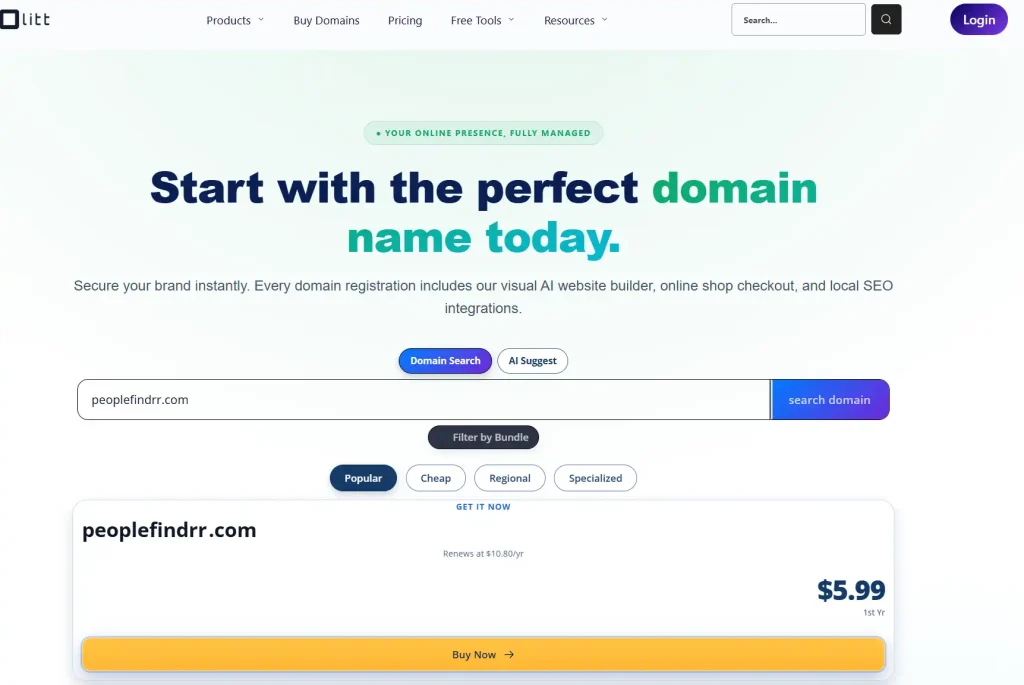
You can snatch, I dont know what for though?.
The Trademark Violation Example
25. AmazonSupplies.com
(If registered by a non-Amazon entity) Piggybacking on established brands violates ICANN’s Uniform Domain-Name Dispute-Resolution Policy (UDRP).
WIPO has resolved over 50,000 domain disputes. Trademark holders will take your domain, and you’ll lose money and time.
Never register domains too similar to established trademarks.
Key Patterns: What the Good Domains Do Right
Let’s extract the lessons from these domain name examples:
1) Length matters brutally. Keep it to 10-16 characters max. Every character beyond that decreases memorability and increases typos. Google is 6 characters. Amazon is 6. Netflix is 7. There’s a pattern.
2) Brandable beats keyword-based. The best domain name examples create their own meaning rather than trying to rank for “best plumber Denver” in the URL. Google’s John Mueller confirmed in 2024 that keyword domains provide no ranking benefit anymore.
3) Say it out loud. If you can’t pronounce it easily or if it sounds weird, it’s wrong. Voice search is rising fast, your domain needs to work verbally.
4) Test for SLURLs. Check your domain written in all lowercase with no spaces. Show it to people who don’t know your brand. If they laugh or look uncomfortable, you’ve got a problem.
5) Avoid numbers and hyphens. There are rare exceptions (like “9gag.com” where the number IS the brand), but generally, they create confusion and look unprofessional.
6) Go for .com when possible. New generic top-level domains (nTLDs) like .tech, .shop, .online are growing 17.4% year-over-year, but .com still dominates trust and recall. If the .com is taken, consider .io for tech, .co for general business, or country code TLDs like .uk if you’re location-specific.
7) Check trademark databases. Use the USPTO (U.S.) or Canadian Intellectual Property Office databases before registering. One trademark dispute can cost you everything.
8) Don’t copy competitors. If your competitor is “WoodWorks.com,” don’t register “Wood-Works.com” or “TimberWorks.com.” Build authentic brand recognition, don’t piggyback.
Industry-Specific Domain Name Ideas
Different industries have different needs. Here’s how to approach domain selection by sector:
i) E-commerce: Focus on brandable over descriptive. Amazon didn’t call itself “OnlineBookStore.com.” Your online branding needs room to grow. Consider .shop or .store TLDs as alternatives.
ii) Tech startups: Short, invented words work well. .io domains are popular in tech (though they’re expensive at $72+ annually). Think Stripe, Zoom, Slack. One or two syllables max.
iii) Local businesses: Geographic identifiers can work. “ChicagoPizza.com” is clear and local. Or use geographic TLDs like .london, .berlin, or .nyc to signal location while keeping the name clean.
iv) Professional services: Trust matters. Stick with .com and choose names that sound established. Professional domain examples should prioritize clarity over cleverness.
v) Blogs: Personality-driven names work. You can be quirkier here. “BoredPanda” has nothing to do with content but everything to do with memorability.
vi) SaaS: Make it verb-able if possible. Shopify, Spotify, Calendly. Names that can become actions stick better in customer minds.
The Domain Registration Checklist (Don’t Skip This)
You’ve got your shortlist. Now what? Here’s your action plan:
1. Check availability across platforms
- Domain registrars (Namecheap, Bluehost, Network Solutions)
- Social media handles (Instagram, Twitter, Facebook)
- Business name registries in your state/country
2. Run trademark searches
- USPTO database (U.S.)
- WIPO for international
- Google the exact name
3. Test pronunciation
- Say it out loud 10 times
- Ask 5 people to spell it after hearing it
- Record yourself saying it, is it smooth or awkward?
4. Check for SLURLs
- Write it in all lowercase, no spaces
- Show it to strangers
- Google it to see what else comes up
5. Verify DNS and ICANN compliance
- Make sure it’s not on domain blacklists
- Check if it was previously registered (use Wayback Machine)
- Avoid domains with toxic backlink histories
6. Consider future growth
- Does this name limit you to one product?
- Can you expand into adjacent markets with this name?
- Will this still make sense in 5 years?
7. Secure the domain and variations
- Buy the .com first
- Consider buying .net, .org to protect your brand
- Register common misspellings if budget allows
Common Domain Mistakes to Avoid
You’ve seen the bad examples. Here are the specific mistakes that kill domains:
i) Adding double letters by combining words.
“TravelerRetreat.com” becomes confusing, how many Rs? How many Ls? Avoid this entirely.
ii) Using regional spellings.
“Color” vs “colour” creates duplicate confusion. Pick one spelling standard and stick to it.
iii) Making it too niche-specific.
“iPhone6Repairs.com” becomes outdated fast. Think broader.
iv) Choosing names too similar to competitors.
This just confuses customers and can trigger trademark disputes.
v) Forgetting to check domain history.
That “premium” domain might have been used for spam. Check its backlink profile and Wayback Machine history before buying.
vi) Ignoring mobile typing. If your domain is annoying to type on a phone keyboard, you’re losing mobile traffic.
Alternative TLDs: When to Use Them
The .com is king, but there are over 1,500 TLDs now. Here’s when alternatives make sense:
a). Country code TLDs (ccTLDs)
Use .uk, .ca, .de, .fr when targeting specific geographic markets. Local trust matters. Google treats these as location signals.
b). Industry-specific TLDs
.tech, .agency, .lawyer, .shop can work if they’re genuinely relevant and the .com is unavailable. They can even help with niche SEO and user expectations.
c). Creative domain hacks
Like “tatt.ly” for Tattly. Use carefully, must be memorable enough to overcome the .com bias.
d). New gTLDs growing fast
.online, .club, .fun are seeing adoption, but they still carry less trust than .com. Use them when branding is so strong it overcomes the extension.
Your Next Steps
Here’s what you do right now:
1. Make a list of 10-20 potential names based on what you’ve learned here. Focus on short, brandable, clear names.
2. Run them through the SLURL test, pronunciation test, and spelling test. Cut anything that fails.
3. Check availability on domain registrars like Namecheap, Bluehost, or Network Solutions. Check social handles too.
4. Search trademark databases. Cut anything with conflicts.
5. Pick your top 3. Sleep on them. Say them out loud the next day. One will feel right.
6. Register immediately. Good domains get taken daily. Once you’ve found your winner, don’t wait.
7. Buy the .com, and consider protective registrations of common variations.
The perfect domain name doesn’t exist. But a great one, one that’s short, memorable, and positions your brand well, that’s absolutely achievable.
You’ve now seen 25 domain examples of what works and what bombs. You know the patterns. You have the checklist.
Stop overthinking. Pick a winner. Register it. Build your business.
Your domain is important, but it’s not everything. Execution matters more than perfection. The best time to register your domain was yesterday.
The second best time is right now.
Go make it happen.
Read also:
- What Is Domain Authority? How It Works & How to Increase It (2026 Guide)
- .COM Domain Generator: Find Your Perfect Name
- How to Create a Domain Name (Step-by-Step Beginner’s Guide)
Frequently Asked Questions About Domain Name Examples
What makes a good domain name?
A good domain name is short, easy to spell, memorable, and simple to pronounce. It should also support your brand without being confusing.
Should I choose a .com domain?
Yes, .com is usually the first choice because it is widely recognized and trusted. If your preferred .com is unavailable, other extensions can still work.
Should I use numbers or hyphens in my domain name?
It is generally better to avoid numbers and hyphens because they can make your domain harder to remember and communicate.
How long should a domain name be?
Keep your domain as short as possible while making it clear and easy to remember. Shorter names are generally easier for people to type and recall.
How can I choose the right domain name for my business?
Start with several short, brandable options, check how they sound when spoken, verify availability, and make sure the name is not too similar to another brand.