You built your Shopify store. You uploaded products. You tweaked the design until it looked perfect.
But nobody’s coming.
If you’re wondering how to get traffic to your Shopify store, you’re not alone. I’ve seen thousands of store owners struggle with this exact problem.
They have amazing products but zero visitors.
Here’s the reality: Building the store is the easy part.
Getting people to actually visit it? That’s where most entrepreneurs fail.
The good news is that driving traffic isn’t rocket science.
It’s a system.
And once you understand the system, you can predictably generate visitors, leads, and sales.
In this post, I’ll share 11 proven strategies that have helped my clients generate millions in revenue. These aren’t theoretical tactics. They’re battle-tested methods that work right now.
By the end of this article, you’ll have a complete roadmap for how to get traffic to your Shopify store – plus real examples you can copy and implement today.
Quick Overview
The traffic problem is simple: Your ideal customers don’t know you exist.
They’re out there searching for solutions. They’re scrolling through social media. They’re reading content. But they’re not finding your store.
Most store owners make the same mistake.
They focus on one traffic source and hope for the best. That’s like putting all your eggs in one basket – risky and unreliable.
The smartest approach is diversification. You want multiple traffic channels working together, creating a steady stream of visitors who are ready to buy.
These 11 strategies fall into three categories:
- Organic traffic (free but takes time)
- Paid traffic (fast but costs money)
- Relationship traffic (leverages other people’s audiences)
Each strategy builds on the others. The more you implement, the more traffic you’ll generate.
Strategy 1: Master SEO for Shopify
The Strategy
Optimize your Shopify store for search engines so customers find you when they’re ready to buy.
Search engine optimization isn’t just about getting traffic. It’s about getting the right traffic – people who are actively searching for what you sell.
Here’s how to implement SEO for your Shopify store:
Start with keyword research. Use tools like Ahrefs, SEMrush, or even Google’s Keyword Planner to find what your customers are searching for.
Look for product-specific keywords, problem-solving keywords, and comparison keywords.
For example, if you sell coffee makers, target keywords like:

- “best drip coffee maker 2025”
- “coffee maker under $100”
- “how to choose a coffee maker”
Next, optimize your product pages. Include your target keywords in:
- Product titles
- Meta descriptions
- Product descriptions
- Image alt text
- URL slugs
Don’t stuff keywords everywhere. Write for humans first, search engines second.
Create content that ranks.
Start a blog on your Shopify store and publish helpful articles related to your products. This positions you as an expert and captures traffic for informational searches.
Why This Works
SEO traffic is incredibly valuable because it’s intent-based. When someone searches “buy organic dog food,” they’re ready to purchase. You’re not interrupting them – you’re helping them find exactly what they want.
Plus, SEO compounds over time. A blog post that ranks well can drive traffic for years without additional investment.
Potential Challenges
SEO takes time. You won’t see results overnight. It typically takes 3-6 months to start ranking for competitive keywords.
Competition is fierce for popular keywords. You might need to target long-tail keywords initially and work your way up to more competitive terms.
Top Tools:
- Ahrefs (keyword research and competitor analysis)
- SEMrush (comprehensive SEO toolkit)
- Google Search Console (free performance tracking)
Strategy 2: Leverage Social Media Marketing

The Strategy
Build a presence on platforms where your customers spend time, then drive them to your store.
Social media isn’t just for brand awareness. It’s a direct traffic channel when used strategically.
Start by choosing the right platforms.
Don’t try to be everywhere at once.
Pick 1-2 platforms where your audience is most active:
- Instagram for visual products (fashion, food, lifestyle)
- TikTok for younger demographics
- Facebook for broader demographics
- LinkedIn for B2B products
- Pinterest for home decor, recipes, DIY
Create content that provides value before asking for the sale. Share tips, behind-the-scenes content, user-generated content, and educational posts.
The 80/20 rule works well: 80% valuable content, 20% promotional content.
Use strategic linking to drive traffic back to your store:
- Link in bio that rotates to feature different products
- Stories with swipe-up links (if you have 10k+ followers or verified account)
- Regular posts mentioning “link in bio”
- Direct links in appropriate contexts
Why This Works
Social media platforms have massive audiences. Instagram has over 2 billion users. TikTok has over 1 billion. Your customers are definitely there.
These platforms also have sophisticated targeting options for paid ads, which we’ll cover in the next strategy.
Social proof is powerful. When people see others engaging with your content and buying your products, they’re more likely to trust you and make a purchase.
Potential Challenges
Social media algorithms change frequently. What works today might not work tomorrow. You need to stay adaptable and test new approaches.
Building an organic following takes time and consistent effort. You can’t post sporadically and expect results.
Each platform has its own culture and best practices. What works on Instagram might flop on TikTok.
Top Tools:
- Buffer (social media scheduling)
- Canva (content creation)
- Later (Instagram-specific scheduling and analytics)
Strategy 3: Run Strategic Paid Advertising

The Strategy
Invest in targeted ads to reach your ideal customers where they’re already spending time.
Paid advertising is the fastest way to get traffic to your Shopify store.
But it requires strategy, not just throwing money at ads and hoping for the best.
Start with Facebook and Instagram ads.
These platforms have the most sophisticated targeting options and work well for most e-commerce businesses.
Create a conversion-optimized funnel:
- Top of funnel: Awareness ads targeting broad interests
- Middle of funnel: Retargeting ads for website visitors
- Bottom of funnel: Dynamic product ads for cart abandoners
Use compelling ad creative that stops the scroll:
- High-quality product images or videos
- Clear value propositions
- Social proof (reviews, testimonials)
- Strong calls-to-action
Test different ad types:
- Single image ads for simple products
- Carousel ads for multiple products
- Video ads for complex products that need explanation
- Collection ads for showcasing your brand
Don’t forget about Google Ads.
While Facebook is great for discovery, Google captures intent. When someone searches “buy running shoes,” they’re ready to purchase.
Why This Works
Paid ads give you immediate results. You can launch a campaign today and get traffic tonight.
The targeting options are incredibly precise. You can reach people based on demographics, interests, behaviors, and even past purchase history.
You can scale what works. Once you find a profitable ad, you can increase the budget and reach more people.
Potential Challenges
Paid advertising requires budget and expertise. If you don’t know what you’re doing, you can burn through money quickly.
Ad costs are increasing across all platforms. Competition drives up prices, especially during peak seasons.
iOS 14.5 and privacy changes have made tracking more difficult, though it’s still effective with proper setup.
Top Tools:
- Facebook Ads Manager (Facebook and Instagram advertising)
- Google Ads (search and display advertising)
- Triple Whale (e-commerce attribution and analytics)
Read also: How to Track Shopify Store Sales (+ Examples)
Strategy 4: Build an Email Marketing System

The Strategy
Capture visitors’ email addresses and nurture them into customers through strategic email campaigns.
Email marketing has the highest ROI of any digital marketing channel – $42 for every $1 spent, according to DMA research.
But most Shopify store owners do email wrong. They collect emails and then… nothing.
Or they send boring promotional emails that get ignored.
Here’s the right approach:
Set up email capture everywhere on your site:
- Exit-intent popups
- Welcome bars
- Embedded forms in blog posts
- Post-purchase surveys
Offer valuable lead magnets in exchange for email addresses:
- Discount codes (the most common)
- Free guides or ebooks
- Exclusive product access
- Loyalty program signup
Create automated email sequences:
- Welcome series for new subscribers
- Abandoned cart recovery (this alone can increase revenue by 15-20%)
- Post-purchase follow-up
- Win-back campaigns for inactive customers
Send regular newsletters with a mix of content:
- Product highlights
- Customer stories
- Educational content
- Behind-the-scenes updates
Why This Works
Email subscribers are 3x more likely to share your content on social media than visitors from other channels.
You own your email list. Unlike social media followers, platform changes can’t take away your subscribers.
Email allows for personalization at scale.
You can segment your list and send targeted messages based on purchase history, interests, and behavior.
Potential Challenges
Building an email list takes time. Don’t expect thousands of subscribers overnight.
Email deliverability is crucial but complex. Poor practices can land your emails in spam folders.
Creating engaging email content requires skill and creativity. Generic promotional emails get ignored or marked as spam.
Top Tools:
- Klaviyo (advanced e-commerce email marketing)
- Mailchimp (beginner-friendly email marketing)
- Privy (email capture and popups)
Strategy 5: Create Valuable Content Marketing

The Strategy
Publish helpful content that attracts your ideal customers and positions you as an expert in your niche.
Content marketing is the foundation of most successful traffic strategies.
It feeds your SEO efforts, provides social media content, and gives you something valuable to share in emails.
Start with understanding your customer’s journey:
- Awareness stage: They realize they have a problem
- Consideration stage: They’re researching solutions
- Decision stage: They’re ready to buy
Create content for each stage:
Awareness content addresses problems and challenges:
- “5 Signs You Need a New Mattress”
- “Why Your Skin Care Routine Isn’t Working”
- “The Hidden Costs of Cheap Coffee”
Consideration content compares solutions:
- “Memory Foam vs. Spring Mattresses: Which Is Right for You?”
- “Natural vs. Chemical Skin Care: A Complete Guide”
- “Drip vs. French Press: Coffee Brewing Methods Compared”
Decision content helps with the final purchase:
- “How to Choose the Right Mattress Size”
- “Our Complete Skin Care Routine for Beginners”
- “Why Our Coffee Beans Are Different (And Better)”
Use multiple content formats:
- Blog posts for SEO
- Videos for engagement
- Infographics for social sharing
- Podcasts for building deeper relationships
Why This Works
Content marketing costs 62% less than traditional marketing and generates 3x more leads.
Quality content builds trust. When customers see you consistently providing value, they’re more likely to buy from you.
Content compounds over time. A single blog post can drive traffic for years.
Potential Challenges
Content creation is time-intensive. You need to consistently produce quality content to see results.
Standing out in crowded niches requires unique angles and exceptional quality.
Measuring content ROI can be difficult since the impact is often indirect and long-term.
Top Tools:
- Surfer SEO (content optimization)
- BuzzSumo (content research and analysis)
- Grammarly (writing assistance)
Read also: How to Promote Your Shopify Store for Free (+ Examples)
Strategy 6: Partner with Influencers

The Strategy
Collaborate with influencers in your niche to tap into their engaged audiences.
Influencer marketing isn’t just for big brands with massive budgets.
Micro-influencers (1K-100K followers) often have higher engagement rates and more affordable rates.
Here’s how to do influencer marketing right:
Find the right influencers:
- Look for engagement rates over follower counts
- Check that their audience matches your target market
- Ensure their content style aligns with your brand
- Verify their followers are real (not bought)
Structure win-win partnerships:
- Free products in exchange for posts (good for new relationships)
- Flat fee per post (predictable costs)
- Affiliate commissions (performance-based)
- Long-term brand ambassador deals (best for ongoing relationships)
Create clear collaboration guidelines:
- Content requirements (number of posts, stories, etc.)
- Hashtag usage
- Disclosure requirements (#ad, #sponsored)
- Timeline and deliverables
Track results carefully:
- Use unique discount codes for each influencer
- Track traffic with UTM parameters
- Monitor brand mentions and tags
- Calculate ROI for each partnership
Why This Works
Influencers have built trust with their audiences.
When they recommend your product, it carries more weight than traditional advertising.
Influencer content feels authentic and native to the platform, making it less likely to be ignored or skipped.
You can reach highly targeted audiences.
A fitness influencer’s followers are perfect for selling workout gear.
Potential Challenges
Finding genuine influencers with engaged audiences takes research. Many have fake followers or low engagement.
Influencer marketing can be expensive, especially for popular creators.
Results can be unpredictable. An influencer post might go viral or completely flop.
Top Tools:
- AspireIQ (influencer discovery and management)
- Upfluence (influencer marketing platform)
- Creator.co (influencer marketplace)
Strategy 7: Optimize for Mobile Traffic
The Strategy
Ensure your Shopify store provides an excellent experience on mobile devices where most traffic comes from.
Over 79% of smartphone users have made a purchase online using their mobile device in the last 6 months.
If your store isn’t mobile-optimized, you’re losing sales.
Mobile optimization goes beyond responsive design:
Page speed is crucial:
- Compress images without losing quality
- Minimize code and plugins
- Use a content delivery network (CDN)
- Choose fast-loading Shopify themes
Read also: How to Skyrocket Your Shopify Store Speed (With Examples)
Simplify navigation:
- Use clear, large buttons
- Minimize form fields
- Implement one-click checkout options
- Make search functionality prominent
Optimize the checkout process:
- Enable mobile payment options (Apple Pay, Google Pay)
- Reduce checkout steps
- Auto-fill shipping and billing information
- Display security badges clearly
Test across devices:
- Check your store on different screen sizes
- Test on both iOS and Android
- Verify all functions work properly
- Monitor mobile analytics regularly
Why This Works
Mobile commerce is growing 3x faster than e-commerce overall. Mobile-optimized stores have higher conversion rates and better user experiences.
Google prioritizes mobile-friendly sites in search results. Poor mobile experience hurts your SEO rankings.
Mobile users are often in micro-moments – ready to make quick purchasing decisions. A smooth mobile experience captures these impulse buyers.
Potential Challenges
Mobile optimization is an ongoing process. New devices and screen sizes are constantly released.
Balancing functionality with simplicity is challenging. You want full features without cluttering the mobile interface.
Testing across all devices and browsers is time-consuming but necessary.
Top Tools:
- Google PageSpeed Insights (speed testing)
- GTmetrix (performance analysis)
- BrowserStack (cross-device testing)
Strategy 8: Implement Referral Programs

The Strategy
Turn your existing customers into a sales force by incentivizing them to refer friends and family.
Word-of-mouth marketing is incredibly powerful. People trust recommendations from friends 92% of the time, but only trust ads 33% of the time.
Design an attractive referral program:
- Offer rewards to both the referrer and the referred customer
- Make the rewards valuable enough to motivate action
- Keep the process simple and easy to share
- Provide multiple sharing options (email, social media, text)
Choose the right reward structure:
- Percentage discounts: “Give 20%, Get 20%”
- Fixed amounts: “Give $10, Get $10”
- Free products: “Refer 3 friends, get a free t-shirt”
- Store credit: Builds loyalty and encourages repeat purchases
Promote your referral program:
- Include it in post-purchase emails
- Add referral links to your website
- Mention it in customer service interactions
- Feature successful referrers in your marketing
Track and optimize:
- Monitor referral conversion rates
- Test different reward amounts
- A/B test messaging and creative
- Analyze which customers make the best referrers
Why This Works
Referred customers have a 37% higher retention rate than customers acquired through other channels.
Referral programs have low customer acquisition costs since you’re leveraging existing customers.
Social proof is built into the process. When someone receives a referral, they already have social proof that the product is good.
Potential Challenges
Not all customers will participate. You need a significant customer base to make referrals work.
Managing referral tracking and rewards can be complex without the right tools.
Fraud prevention is important. Some people try to game the system with fake referrals.
Top Tools:
- ReferralCandy (comprehensive referral platform)
- Friendbuy (referral and loyalty programs)
- Extole (enterprise referral solutions)
Strategy 9: Leverage User-Generated Content
The Strategy
Encourage customers to create content featuring your products, then use that content to attract more customers.
User-generated content (UGC) is marketing gold. It’s authentic, trustworthy, and free.
Encourage UGC creation:
- Create branded hashtags for your products
- Run contests and giveaways
- Feature customers on your social media
- Send follow-up emails asking for photos
- Offer incentives for reviews with photos
Make it easy for customers to share:
- Include sharing instructions with products
- Provide photo tips and suggestions
- Create unboxing experiences worth sharing
- Include props or backgrounds in packages
Leverage UGC across channels:
- Feature customer photos on product pages
- Share UGC in social media posts
- Include customer photos in email campaigns
- Create UGC galleries on your website
- Use customer videos in advertising
Always get permission and give credit:
- Ask before using customer content
- Tag customers when sharing their content
- Consider offering small rewards for featured content
- Respect copyright and privacy preferences
Why This Works
UGC increases conversion rates by up to 4.6% according to PowerReviews research.
Customer photos are more trustworthy than professional product shots. They show real people using real products.
UGC creates a community around your brand. Customers feel valued when their content is featured.
Potential Challenges
You can’t control the quality or message of user-generated content. Some customer photos might not meet your brand standards.
Getting customers to create content requires ongoing encouragement and incentives.
Legal issues can arise if you use customer content without proper permission.
Top Tools:
- Yotpo (reviews and UGC collection)
- Bazaarvoice (comprehensive UGC platform)
- Pixlee (visual marketing and UGC)
Read also: How to Link Shopify to TikTok and Skyrocket Your Sales
Strategy 10: Build Strategic Partnerships
The Strategy
Form mutually beneficial partnerships with complementary businesses to access new audiences.
Strategic partnerships let you tap into established audiences without starting from scratch.
Identify potential partners:
- Businesses serving the same customers but not competing directly
- Companies with complementary products or services
- Brands with similar target demographics but different niches
- Local businesses if you have a geographic component
Types of partnerships to consider:
- Cross-promotion: Promote each other’s products to your audiences
- Bundle deals: Package complementary products together
- Affiliate partnerships: Earn commissions for referring customers
- Content collaboration: Create joint content, webinars, or events
- Product integration: Integrate products or services together
Structure win-win agreements:
- Define clear expectations and deliverables
- Establish success metrics and tracking methods
- Create fair revenue sharing arrangements
- Set communication protocols and timelines
- Include exit clauses for unsuccessful partnerships
Examples of successful partnerships:
- A coffee company partnering with a pastry shop for bundle deals
- A fitness apparel brand collaborating with a nutrition supplement company
- A home decor store partnering with an interior design service
Why This Works
Partnerships provide access to pre-qualified audiences who already trust your partner.
Joint ventures often cost less than traditional advertising while providing more credibility.
Partnerships can lead to innovative product offerings that neither business could create alone.
Potential Challenges
Finding the right partners takes time and research. Not all partnerships will be successful.
Managing partnerships requires ongoing communication and relationship maintenance.
Revenue sharing can be complex to track and manage fairly.
Top Tools:
- PartnerStack (partner relationship management)
- Crossbeam (partner ecosystem intelligence)
- Partner Fleet (partnership automation)
Strategy 11: Optimize Your Google My Business
The Strategy
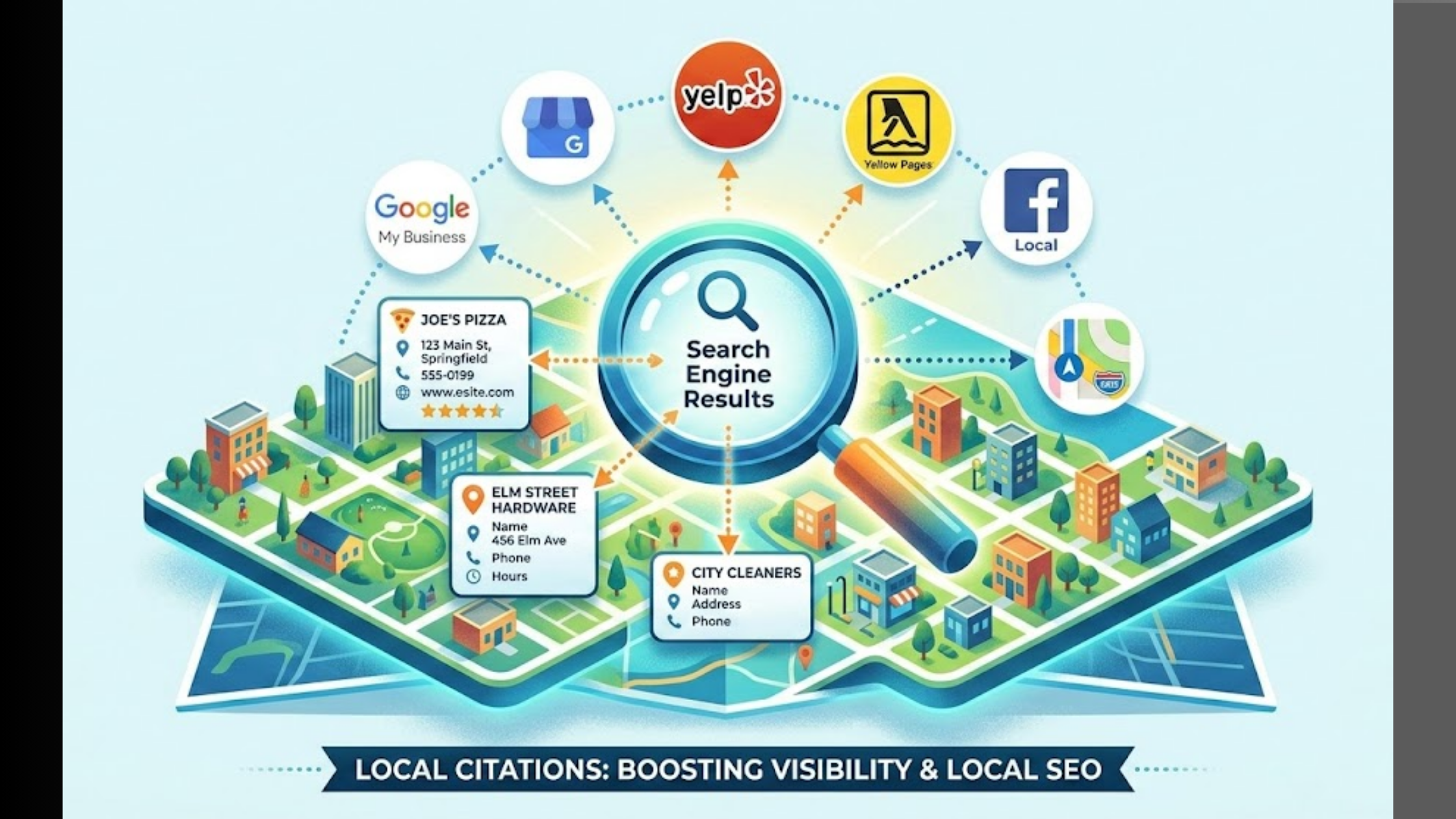
Claim and optimize your Google My Business listing to capture local search traffic.
Even if you’re primarily an online retailer, local SEO can drive significant traffic, especially for businesses with physical locations or local customer bases.
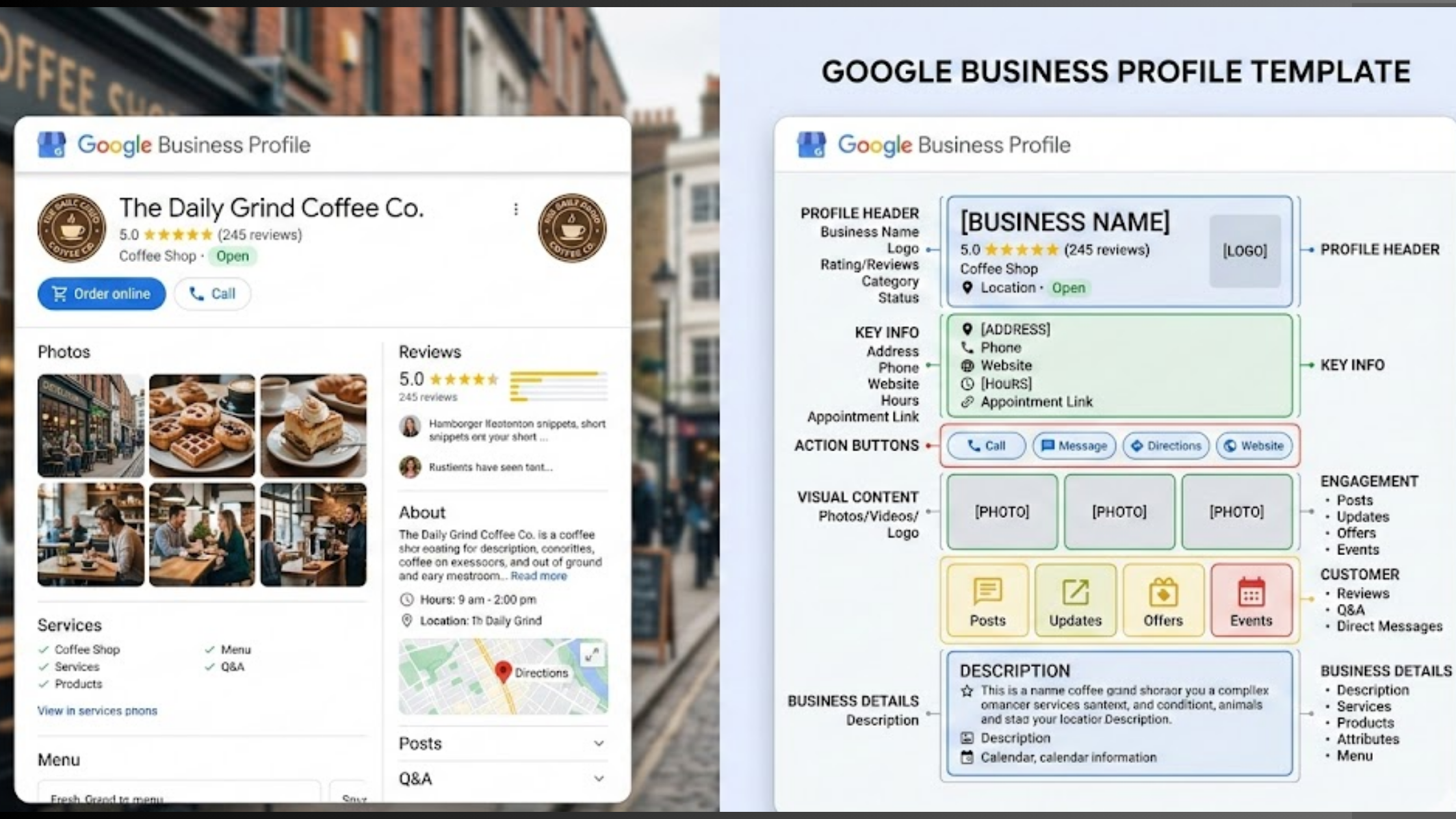
Complete your Google My Business profile:
- Add accurate business information (name, address, phone, hours)
- Upload high-quality photos of your products and location
- Choose relevant business categories
- Write a compelling business description
- Add your website URL and social media links
Encourage and respond to reviews:
- Ask satisfied customers to leave Google reviews
- Respond to all reviews, both positive and negative
- Use keywords naturally in your responses
- Address specific concerns mentioned in negative reviews
- Thank customers for positive feedback
Post regular updates:
- Share new products or services
- Announce special offers or events
- Post behind-the-scenes content
- Share customer success stories
- Include relevant keywords in your posts
Use Google My Business features:
- Add product catalogs
- Enable messaging if appropriate
- Create posts about events or offers
- Upload videos when possible
- Monitor insights and analytics
Why This Works
Google My Business listings appear prominently in local search results and Google Maps.
Local searches have high commercial intent. People searching locally are often ready to buy.
Positive reviews and ratings build trust and credibility with potential customers.
Potential Challenges
Managing Google My Business requires ongoing attention to maintain accuracy and engagement.
Negative reviews can hurt your reputation if not handled properly.
Local SEO competition can be intense in some markets.
Top Tools:
- Google My Business (free listing management)
- BirdEye (review management)
- Whitespark (local SEO tools)
How to Implement These Tips
Getting traffic to your Shopify store isn’t about implementing all 11 strategies at once. That’s a recipe for burnout and poor execution.
Start with the foundation:
- Mobile optimization – This affects every other strategy
- SEO basics – Set up proper page titles, descriptions, and site structure
- Email capture – Start collecting emails from day one
Choose your primary traffic channel: Based on your budget, skills, and timeline, pick one main strategy to focus on:
- Limited budget, have time: Focus on content marketing and SEO
- Have budget, need fast results: Start with paid advertising
- Good with social media: Begin with social media marketing
- Existing network: Leverage partnerships and referrals
Implementation timeline:
- Week 1-2: Set up foundation (mobile, basic SEO, email capture)
- Week 3-4: Launch your primary traffic strategy
- Month 2: Add your second traffic channel
- Month 3: Begin testing additional strategies
- Month 4+: Scale what’s working, eliminate what isn’t
Track everything from the beginning:
- Set up Google Analytics 4
- Install Facebook Pixel (even if not running ads yet)
- Use UTM parameters for all external links
- Monitor key metrics weekly
Tools you’ll need:
- Analytics: Google Analytics, Google Search Console
- Email marketing: Klaviyo or Mailchimp
- Social media: Buffer or Later
- SEO: Ahrefs or SEMrush (start with free versions)
- Design: Canva for creating content
The key is consistency and patience. Traffic building is a marathon, not a sprint.
Common Mistakes to Avoid
I’ve seen thousands of Shopify store owners make the same traffic-killing mistakes. Here are the big ones to avoid:
Mistake #1: Focusing on vanity metrics
Don’t obsess over page views or social media followers. Focus on metrics that matter:
- Conversion rate
- Average order value
- Customer lifetime value
- Return on ad spend (ROAS)
Mistake #2: Ignoring mobile users
If your store isn’t mobile-optimized, you’re losing 70%+ of potential customers. Test your site on multiple devices regularly.
Mistake #3: Not capturing emails
Every visitor who leaves without buying should at least give you their email address. Set up email capture immediately.
Mistake #4: Trying everything at once
Jack of all trades, master of none. Pick 2-3 strategies and execute them well rather than doing 10 strategies poorly.
Mistake #5: Impatience with results
SEO takes 3-6 months. Content marketing takes 6-12 months. Social media takes 6+ months. Plan accordingly.
Mistake #6: Not testing and optimizing
What works for other stores might not work for yours. Test different approaches and double down on what works.
Mistake #7: Ignoring customer feedback
Your customers tell you exactly what they want. Listen to reviews, support emails, and social media comments.
Mistake #8: Poor product photography
Blurry, dark, or unprofessional photos kill conversions. Invest in quality product images.
Mistake #9: Complicated checkout process
Every extra step in checkout reduces conversions by 10-15%. Simplify ruthlessly.
Mistake #10: No clear value proposition
Visitors should understand what you sell and why they should buy from you within 5 seconds of landing on your site.
Advanced Tips for Experts
Once you’ve mastered the basics, these advanced strategies can take your Shopify store traffic to the next level:
Advanced SEO tactics:
- Create topic clusters around your main keywords
- Optimize for featured snippets and voice search
- Build high-quality backlinks through PR and outreach
- Implement structured data markup for rich snippets
Sophisticated paid advertising:
- Use lookalike audiences based on your best customers
- Implement proper attribution modeling
- Create dynamic retargeting campaigns
- Test advanced bidding strategies (target ROAS, maximize conversions)
Email marketing automation:
- Set up behavioral triggers based on browsing history
- Create win-back campaigns for churned customers
- Implement predictive analytics for send-time optimization
- Use advanced segmentation based on lifetime value
Content marketing excellence:
- Create comprehensive pillar pages that cover topics in-depth
- Develop original research and data-driven content
- Build topic authority through consistent, expert-level content
- Optimize for search intent, not just keywords
Partnership sophistication:
- Develop exclusive product collaborations
- Create joint ventures with revenue sharing
- Build affiliate networks in your niche
- Leverage partnership data for customer insights
Conversion rate optimization:
- Implement advanced A/B testing across the entire funnel
- Use heat mapping and user session recordings
- Optimize for micro-conversions (email signups, account creation)
- Personalize experiences based on traffic source and behavior
These advanced tactics require more resources and expertise but can dramatically improve your results.
Measuring Success
You can’t improve what you don’t measure.
Here are the key metrics to track for how to get traffic to your Shopify store:
Traffic metrics:
- Organic traffic growth: Month-over-month increase in search traffic
- Traffic source diversity: Percentage of traffic from different channels
- New vs. returning visitors: Balance of acquisition and retention
- Traffic quality: Pages per session, time on site, bounce rate
Conversion metrics:
- Overall conversion rate: Percentage of visitors who make a purchase
- Channel-specific conversion rates: Which traffic sources convert best
- Average order value: Revenue per transaction
- Customer acquisition cost: Cost to acquire each new customer
Revenue metrics:
- Monthly recurring revenue: Consistent revenue growth
- Return on ad spend (ROAS): Revenue generated per dollar spent on ads
- Customer lifetime value: Total revenue per customer over time
- Revenue attribution: Which channels drive the most revenue
Engagement metrics:
- Email open and click rates: Email marketing effectiveness
- Social media engagement: Likes, comments, shares, saves
- Content performance: Blog post views, time on page, social shares
- User-generated content: Customer reviews, photos, mentions
Tools for measurement:
- Google Analytics 4: Comprehensive website analytics
- Google Search Console: SEO performance tracking
- Facebook Analytics: Social media and ad performance
- Email platform analytics: Klaviyo, Mailchimp insights
- Shopify Analytics: Built-in e-commerce metrics
Set up monthly reporting to track progress:
- Compare month-over-month growth
- Identify top-performing channels
- Spot trends and seasonal patterns
- Adjust strategies based on data
Remember: Focus on trends over individual data points. One bad week doesn’t mean your strategy is failing.
Final Thoughts
Learning how to get traffic to your Shopify store isn’t a mystery. It’s a system.
The 11 strategies I’ve shared aren’t theoretical. They’re proven methods that have generated millions in revenue for e-commerce businesses just like yours.
Here’s what you need to remember:
- Start with the foundation (mobile optimization, basic SEO, email capture)
- Choose one primary traffic strategy and master it
- Be consistent and patient – traffic building takes time
- Measure everything and optimize based on data
- Scale what works, eliminate what doesn’t
The businesses that win aren’t the ones with the biggest budgets. They’re the ones that execute consistently and adapt quickly.
Your competitors are probably making the common mistakes I outlined. They’re trying everything at once, ignoring mobile users, and giving up too quickly.
That’s your opportunity.
Pick one strategy from this list. Implement it properly. Give it time to work. Then add another strategy.
In 6-12 months, you’ll have a predictable system for driving traffic to your store. In 12-24 months, you’ll have multiple traffic channels working together to grow your business.
The question isn’t whether these strategies work. The question is: Will you implement them?
Your Shopify store is waiting. Your customers are out there. Now you know how to get traffic to your Shopify store.
Time to get to work.
Additional Resources
SEO Tools:
- Ahrefs – Comprehensive SEO toolkit
- SEMrush – All-in-one marketing toolkit
- Google Search Console – Free SEO insights
Social Media Management:
- Buffer – Social media scheduling
- Later – Visual content calendar
- Canva – Design tool for social content
Email Marketing:
- Klaviyo – Advanced e-commerce email marketing
- Mailchimp – Beginner-friendly email platform
- Privy – Email capture and conversion tools
Analytics and Tracking:
- Google Analytics 4 – Website analytics
- Triple Whale – E-commerce attribution
- Hotjar – User behavior analytics
Content Creation:
- Surfer SEO – Content optimization
- BuzzSumo – Content research
- Grammarly – Writing assistance
Paid Advertising:
- Facebook Ads Manager – Facebook and Instagram ads
- Google Ads – Search and display advertising
- AdEspresso – Facebook ad optimization
Influencer Marketing:
- AspireIQ – Influencer relationship management
- Upfluence – Influencer discovery platform
- Creator.co – Influencer marketplace
Frequently Asked Questions
Q: How long does it take to see traffic results for a new Shopify store?
A: It depends on your strategy. Paid ads can drive traffic immediately, while SEO typically takes 3-6 months. Social media and content marketing usually show results in 3-6 months with consistent effort. The key is starting with strategies that match your timeline and budget.
Q: What’s the most cost-effective way to drive traffic to my Shopify store?
A: Content marketing and SEO offer the best long-term ROI, but require time and effort. If you need faster results with a limited budget, focus on social media marketing and email list building. These strategies cost more time than money.
Q: Should I focus on one traffic source or diversify immediately?
A: Start with one primary strategy and master it before adding others. Trying to do everything at once leads to poor execution across all channels. Once you’re seeing consistent results from one source, gradually add complementary strategies.